

MOVEMENT JOURNAL
POSTURAL & ERGONOMIC TRAINING · FOURWAYS
If you are deciding between a laptop stand and a new ergonomic chair, start by looking at what makes your working day difficult. There is no single purchase that should come first for everyone. A chair will not fix a screen that is too low; raising a laptop will not help much if you then have to reach up to its keyboard.
For many laptop users, the practical question is whether they can separate the screen from the typing surface. For others, the chair’s height, depth or support is the obstacle. Work through those relationships before buying the most impressive item in the catalogue.
This guide is a starting point for a workstation conversation, not a diagnosis of neck or back pain. Broadacres Physio offers postural and ergonomic training in Fourways. Ask the practice what guidance is appropriate for your situation and whether photographs of your working setup would be useful.
Look at the work, not just the furniture
A desk can look excellent in a photograph and still make your actual tasks awkward. Think about where you spend your attention: reading on a screen, entering figures, taking handwritten notes, handling calls or switching between documents. Those tasks may need different arrangements.
Sit where you normally work and notice what you do without thinking. Do you move towards the screen to read? Keep your mouse beyond a pile of papers? Twist towards a second screen during most of the day? These are useful observations, not reasons to judge your posture.
Start with the dominant task. If you type for hours, make the keyboard and screen relationship a priority. If you mainly attend calls and read documents, check where those items sit. If several people share a desk, adjustment needs to be practical enough to happen when users change.
Take a photograph for a purpose
A side view can show the relationship between the screen, arms, chair and feet. A front view may reveal a screen that sits off to one side. If your physiotherapist requests photographs, take them in the position you actually use, rather than staging the neatest possible version.
Ask how to share them appropriately and avoid including private documents or other people. An assessment may require more than a photograph, especially when symptoms are part of the reason for seeking help.
When a laptop stand addresses the real problem
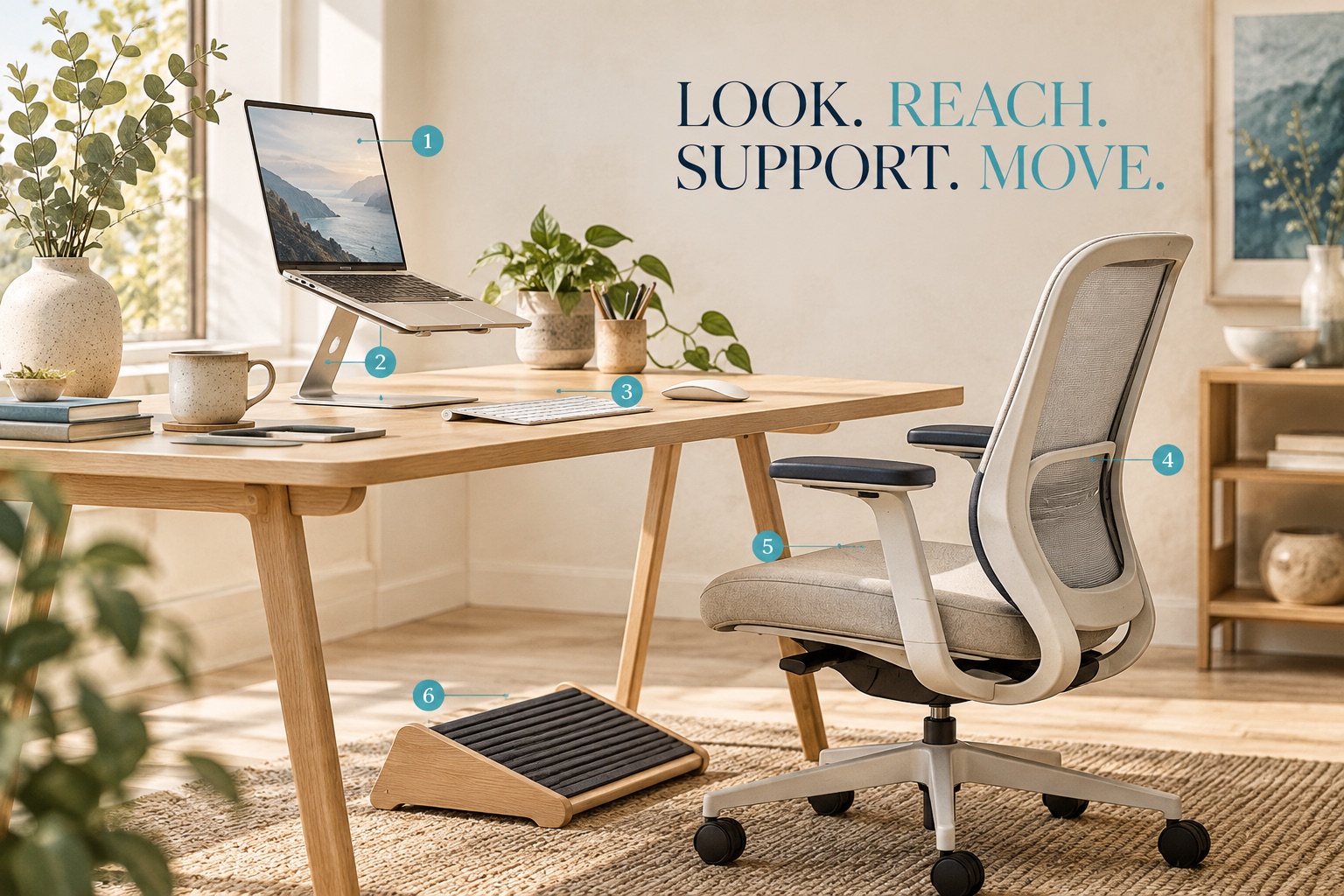
A laptop connects the display and keyboard in one object. Moving the display higher moves the built-in keyboard higher too. That is why a stand should be considered as part of an arrangement, rather than as a complete workstation upgrade by itself.
The UK Health and Safety Executive’s practical screen-work guidance recommends a separate keyboard and mouse with a raised laptop for prolonged use. It also suggests a screen roughly an arm’s length away, with its top around eye level, and input devices positioned to keep the shoulders relaxed.
Treat these as starting points to adjust, rather than exact measurements you must force your body to match. Screen size, vision, the task and your own comfort matter. This is practical international guidance; it is not a statement of South African workplace law.
Before buying the stand
Check whether your desk has room for the separate keyboard and mouse. Consider the stability of the stand, the laptop’s ventilation requirements and the space needed for papers. A setup that leaves no usable typing area has traded one inconvenience for another.
If you move between an office in Fourways and a home workstation, consider what you can reliably carry and reconnect. The elegant setup that only happens on Fridays is less useful than a manageable arrangement used during the rest of the week.
When the chair deserves attention first
A chair becomes the priority when you cannot arrange useful support and a comfortable working height with the one you have. Look at whether your back is supported, the seat allows space behind the knees and your feet can be supported. Check whether armrests stop you getting close enough to the desk.
The HSE guidance includes back and thigh support, a gap behind the knees and keeping the keyboard and mouse close. The aim is a workable relationship among the person, chair and desk. A chair labelled “ergonomic” still needs adjustment and may not fit every person or every desk.
Before replacing it, understand the controls on your current chair. A height lever, back adjustment or armrest setting may have been left in the same position since the chair arrived. If a control is broken or the chair is unstable, that is a separate practical problem to address.
Ask to try it before committing
Where possible, test a prospective chair at a desk with a comparable height. Check whether the seat depth suits you, adjustments are accessible and you can move close enough to work. Think about whether a shared user can adjust it again easily.
Do not choose purely from the appearance of cushioning or a promised luxury finish. Comfort in a brief showroom sit does not tell you everything about your workday. Ask the supplier about dimensions, adjustments and return conditions before purchasing.
Make small changes in a sensible order
You do not need to redesign the room in one afternoon. Identify the obvious obstacle, change it and notice what happens during normal work. Keep a brief note of the task that felt easier or remained awkward.
For example, an illustrative laptop user might first move a pile of files so the mouse sits beside the keyboard. Another might discover that the chair’s armrests prevent approaching the desk. Those two people have different first steps, even if both describe shoulder discomfort.
These are examples, not client results or evidence that any single adjustment treats pain. If discomfort persists, an assessment can help you decide what else needs attention rather than continuing to shop by trial and error.
A short priority checklist
- Can you see the screen clearly without repeatedly moving towards it?
- Are the keyboard and mouse within a comfortable reach?
- Can your chair support you without blocking access to the desk?
- Are your feet supported and the space under the desk usable?
- Can you change position and alternate tasks during the day?
If you cannot answer because you are unsure what to adjust, that uncertainty is a useful question for your physiotherapist.
Give your routine the same attention as your equipment
A better workstation does not require you to hold one position all day. The HSE’s guidance on work routines favours short, frequent breaks or changes of activity over occasional long breaks. Opportunities to stand, move and change position are useful considerations alongside the equipment.
Build changes around the work you actually do: getting up between calls, collecting a document or changing task after a concentrated block. Discuss a manageable routine if your role makes breaks difficult. There is no need to turn every pause into a demanding exercise session.
If pain is persistent, worsening or worrying you, seek advice instead of assuming the desk explains everything. The NHS neck-pain guidance also advises assessment for symptoms such as pins and needles or a cold arm. An equipment purchase is not a substitute for investigating concerning symptoms.
Frequently asked questions
Can I simply put my laptop on a pile of books?
A stable temporary riser may help you explore a screen position, but check safety and ventilation, and use separate input devices for prolonged typing. Do not work with an unstable arrangement or blocked vents.
Is standing all day the answer?
Changing from one fixed position to another does not create variety by itself. Consider tasks, comfort, support and opportunities to move, rather than treating prolonged standing as a universal solution.
Should everyone use the same screen height?
General guidance offers a starting point. Adjustments may be needed for your vision, screen, task and individual circumstances. Ask for advice if the suggested position makes viewing more difficult.
What should I bring to an ergonomic consultation?
Describe your main tasks, working hours, symptoms and available equipment. Ask whether the practice would like photos or measurements. The first-visit guide helps you prepare for a broader clinical assessment.
YOUR NEXT STEP
Book an assessment in Fourways
Describe your work tasks and what feels awkward. Ask about an assessment and suitable guidance for your setup.
011 467 8300 · admin@baphysio.co.za
Broadacres Shopping Centre, corner Cedar & Valley Road, Fourways.
General educational information. Individual assessment and advice may differ.
Add a Comment